
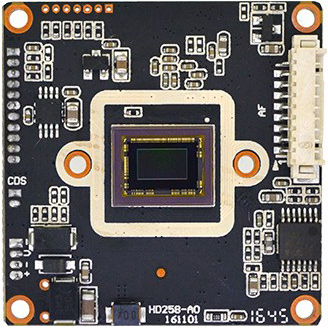
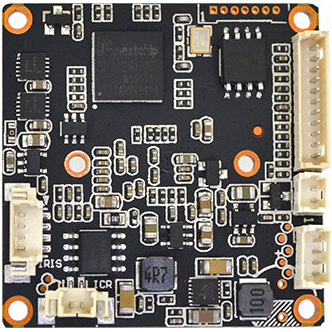
1/2.9" Sony Starlight IMX290 1080P 2MP Nextchip NVP2450H AHD TVI CVI Analog(CVBS) 4 in 1 CCTV security Camera board 3X AF UTC
$20.50
Availability:
In stock
Out of stock
Variations
Product Attributes
Product Description
Technical Characteristics:
Image sensor Sony Starlight IMX290, output AHD / TVI / CVI / Analog(CVBS), Effective resolution is 1920 * 1080 / 960H
OSD menu supports 15 different languages with BLC / strong light inhibition / motion detection / privacy protection, 2D / 3D noise reduction function
Adopt Nextchip 2450H DSP, with OSD function (mirror image, color / white-black, PAL / NTSC)
Support 3X AF + UTC + UTC controls AF With WDR Support auto iris
AGC type, day-night effect is distinct, various day-night modes can be switched by OSD menu, with screen-frozen function.
Support UTC, 4 in 1, switched by OSD, Enhancement adjusted supported by OSD
Power (600W) & Video (2KV) dual-lightning protection design, OSP antioxidant PCB, size 32 * 38 dual-board
| Product parameters | |
| Main Chip | Nextchip NVP2450H |
| Image Sensor | 1/2.8" Sony Starvis IMX290 |
| Effective Pixels | 1920(H) * 1080(V) |
| Effective resolution | 1080P 2MP |
| Signal system | PAL/NTSC (Switched by OSD) |
| Day-night mode | External (default) / Auto / Color / White& black (OSD switch) |
| S/N ratio | ≥41dB |
| Minimum illuminaiton | 0.001LUX |
| BLC | AUTO |
| (AES) Auto electronic shutter | AUTO / 1/50(1/60)-1/50,000sec |
| (AWB)Auto white balance | AUTO |
| IR control voltage input | OFF(DC 0V) / ON(DC 3-8V) |
| OSD language | English / Simplified Chinese / Traditional Chinese / German / French / Italian / Spanish / Polish / Russian / Portuguese / Dutch / Turkish / Korea / Japanese / Hebrew / Arabic |
| Video output | AHD / TVI / CVI / Analog (CVBS) 1080P& 960H |
| Video record occupation | 1minute about 38.3MB (4mm lens) |
| Power consumption | DC12V / 117mA ± 6mA (wide voltage 9V-18V) |
| Working temperature | -20°C to 50°C |
OSD Function description :
PAL / NTSC: Enter into OSD menu, enter into option 8 (adjust) and then go into option 5 (NTSC / PAL) to switch freely, Press left / right button to switch freely, press left button (press shortly) once to Pal, twice to NTSC, left button to return, press enter to save (default is Pal)
4-in-1 Switch: 2 methods:
(1) Enter into OSD menu, enter into option 8 (adjust) and then go into option 1 (Monitor) to switch freely, press right button (press shortly) once is CVI, Twice is TVI, three times is CVBS, four times to stop, press left button to return, press enter to save (default is AHD)
(2) Default is AHD 1080P, enter into OSD menu-exposure (press right button 3 times) -enter, goes into factory debugging mode, so you can switch freely.
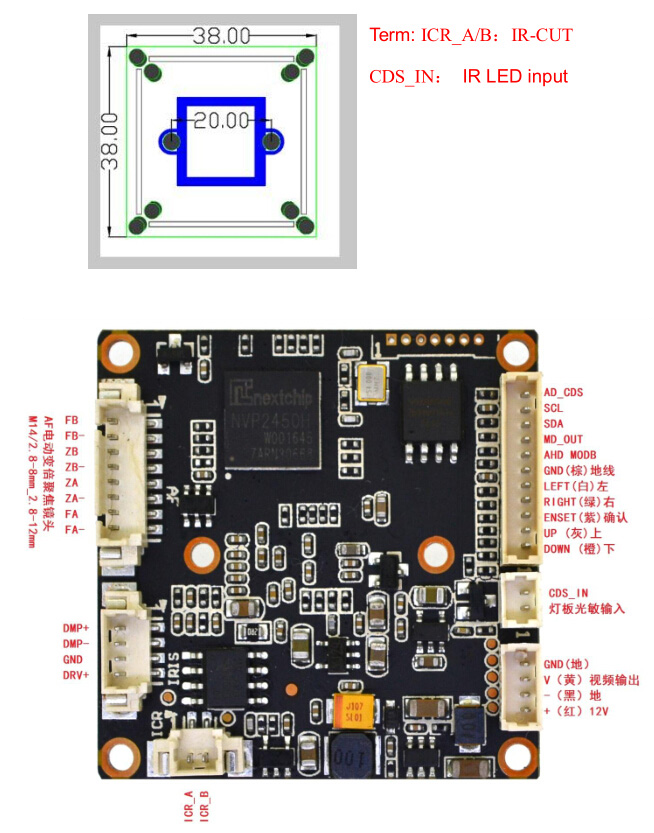
OSD menu shortcut key:
This product supports Auto-focus and zoom function, the matched function for OSD menu shortcut key is as following:
LEFT( Focus +) RIGHT( Focus -) UP( Zoom +) DOWN( Zoom +)
Pin definition:
OSD Menu Port
D Down (Orange)
U Up (Gray)
E Enset (Purple)
R Right (Green)
L Left (White)
G GND (Brown)
M1 M2 Can set to Mode switch or Alarm Output
Power video port
V Yellow
-/G Ground
+ Power+
CDS LED board photoresist
ICR IR-CUT dual filter switch
Matched motorized lens:(The program should be corresponding with the millimeter of lens)
(1) M14/2.8-8mm_1/2.7(1.25*8pin)
(2) M14/2.8-12mm_1/2.7(1.25*8pin)
Recommended lens: D14-02812IR(3MP)-C-EE / D14-02812ICR(3MP)-C-EE( with ICR)
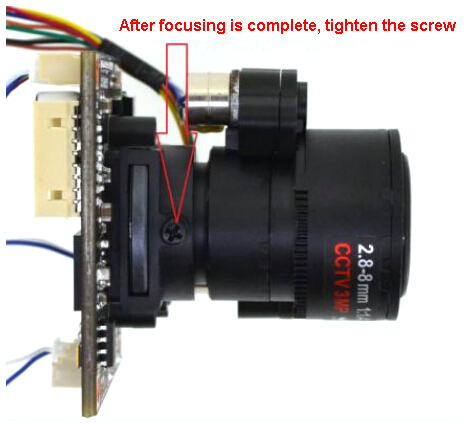
The operation and notice for adjusting & installing AF electric lens:
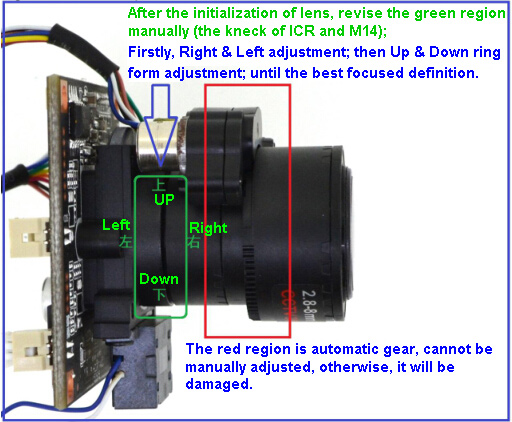
After
the initialization of lens, revise the green region manually (the kneck of ICR and M14)
Firstly-- Right& Left adjustment then-- Up
& Down ring form adjustment until the best focused definition.
The red region is automatic gear, cannot be manually adjusted, otherwise it will be damaged.
AHD 3X AF Features
(1) This board support motorized lens M14 / 2.8-8mm or 2.8-12mmAF, support UTC, onboard DC lens (Auto Iris) function.
(2) Support UTC, you can use mouse wheel or Dynamic arrow to control AF zoom, or operate ZOOM or Focus via DVR's UTC, manual-focus, auto-focus, and several modes can be used.
(3) You can set the modules' parameter via DVR'S UTC, and you can also switch output AHD 1080P or CVBS 960H
(4) With TDN AF (Auto focus after Day-Night switched) on the OSD menu, Unique AF algorithm, no matter it's day or night, after IR-Cut switched, the image can be at the optimum definition.
UTC technique introduction:
UTC means Up the Coax (UTC), transferring 2 kinds of signal via general coaxial cable.
One is image signal, the other is control signal. Use coaxial cable to transfer video signal and control signal from cameras at the same time, through the function you can control the cameras by DVR with UTC function easily, including OSD menu parameter setting and so on.